Download Gmail Mobile for web apps: Gmail on the go
Gmail Mobile for web apps is a browser-based version of the Gmail Mobile app optimized for mobile devices. Unlike the native Gmail Mobile app, Gmail Mobile for web apps entirely runs on a web browser like Chrome and isn’t built for any platform such as iOS or Android. It is an excellent option for users who don’t have access to the Gmail Mobile app or don’t want to install additional apps on their phones.
Top Recommended Alternative

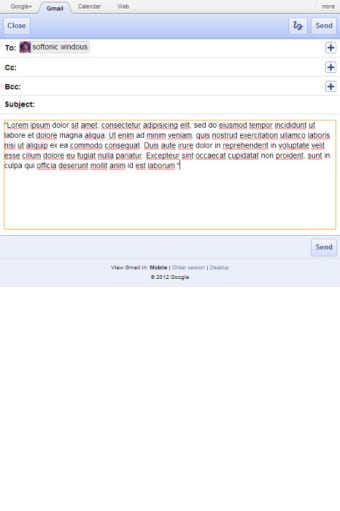
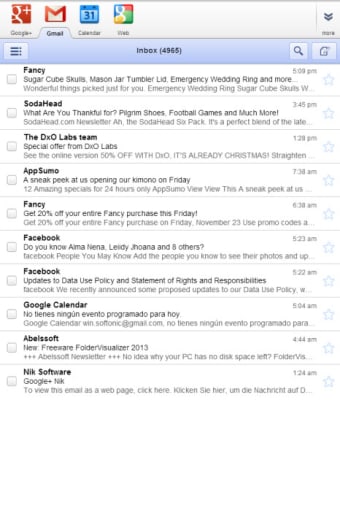
Gmail Mobile for web apps works similarly to Gmail and Gmail Mobile, allowing you to send and receive emails, search your inbox, and even attach and view attachments. The main difference between this version and the desktop version is that it is optimized to work smoothly on smaller screens while retaining the major functionalities of its desktop counterpart. Once you download Gmail Mobile for web apps, you can write, read, sort, and manage your emails from any device as long as it has a browser installed.
Gmail Mobile vs. Gmail Mobile for web apps: What is the difference?
It is essential to understand that native mobile apps and web apps are not the same. What’s the difference? Native mobile apps are developed for a specific platform, which could be iOS or Android, and they are downloadable and installed via an app store and get access to system resources. On the other hand, web apps are not built for any particular platform and don’t need to be downloaded or installed. They are accessed via an internet browser like Google Chrome and will adapt to whichever devices you view them. So, to access Gmail Mobile, you must visit either the iOS store or Play Store and download and install the app. However, for Gmail Mobile for web apps, you only need a web browser like Chrome to access your email account.
What’s Gmail, and what can you do with Gmail Mobile for web apps?
Gmail is a web-based email service provided by Google that is integrated with their services like Drive, Docs, Calendar, Keep, and more. It can be accessed through a web browser, and the web app version provides an easier way to access your email account without downloading the app. Here are some things you can do with Gmail Mobile for web apps:
- Send and receive emails: Gmail Mobile for web apps lets you send, receive, reply, and forward emails to recipients directly from your browser.
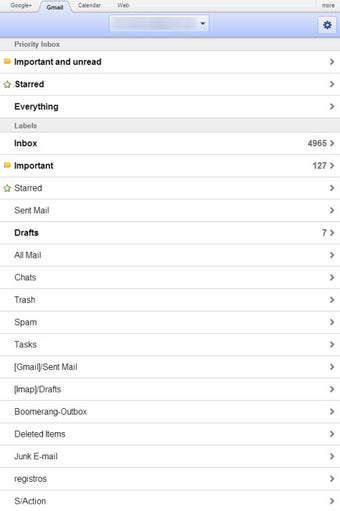
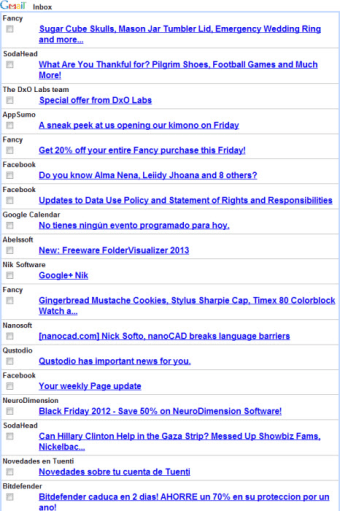
- Organize your inbox: Using labels, tabs, and folders, you can organize and categorize emails for easy access, helping you keep track of important information.
- Search through your inbox: Gmail Mobile for web apps has a built-in search function that allows you to comb through your email using keywords, sender names, subject lines, or email addresses to find old emails.
- Attach and view attachments: Just like in the mobile app, the web version of Gmail Mobile allows you to attach and download attachments from emails, allowing you to share images, videos, documents, audio files, and more.
- Mark emails as read or unread: Gmail Mobile for web apps lets you mark emails as read or unread to keep track of important information for later review.
- Prioritize emails: You can star emails to mark them as a priority and use the sort function to filter through your inbox to show only starred emails.
Key features of Gmail Mobile for web apps
Gmail Mobile for web apps offers several handy features to make your email experience as smooth as possible. These features include:
- Lightweight app: Since it is built to run on web browsers and doesn’t need to be downloaded, Gmail Mobile for web apps is lightweight and designed to run fast even with a slower internet connection.
- Optimized for touch: Gmail Mobile for web apps is built for mobile phones, so the interface is tailored for touch, allowing users to easily interact with the app with taps and swipes. Swiping up or down lets you scroll through your inbox, and tapping enables you to open an email and interact with the various functions, and swiping left or right on an email allows you to archive it.
- Integration with Google Services: Gmail Mobile for web apps seamlessly integrates with other Google apps and productivity tools.
- Security: Like the mobile app, the web app version of Gmail Mobile has robust security features, including two-factor (2FA) authentication, phishing detection, and spam filtering.
- Archive: This feature lets you declutter your inbox, archiving emails you don’t need now but might want to save for later. Archived emails remain searchable in the ‘All Mail’ folder for up to 30 days.
- Trash: This is another feature for decluttering your inbox, allowing you to delete emails you no longer need. Deleted emails are sent to the ‘Trash’ folder and will be available for 30 days before permanent deletion.
- Simple interface: Gmail Mobile for web apps takes on a simple interface, making it easy to navigate and use even on smaller screens.
Gmail Mobile for web apps provides a free web-based email service you can access from anywhere, anytime. All you need to run it are your Google account credentials, a browser, and an internet connection. It is an excellent option for users seeking flexibility and convenience, and it offers many benefits, including:
- It works on any device – smartphones and tablets
- It doesn’t require installation
- It's secure
- It's always up-to-date
- Offers great security features
- Cross-platform compatibility
- It’s lightweight and fast